By using this site, you agree to the Privacy Policy and Terms of Use.
Accept
GizmoGeek HubGizmoGeek Hub
  • Gadgets
    • Smartphone
    • Laptop
  • Reviews
  • Tech News
  • How-to Guides
    • Windows
    • MacOs
    • iOS
    • Android
  • Wearables
  • Videos
Search
  • About Us
  • Contact
  • Privacy Policy
  • Terms and Conditions
  • Join Us
© 2025 GizmoGeek Hub | Proudly part of Cre8sphere Media | Made with ❤️ at Origin8 | All rights reserved.
Reading: Access BIOS on Any PC and change the boot order: Easy Steps!
Share
Sign In
Notification Show More
Font ResizerAa
Font ResizerAa
GizmoGeek HubGizmoGeek Hub
  • Gadgets
  • Reviews
  • Tech News
  • How-to Guides
  • Wearables
  • Videos
Search
  • Gadgets
    • Smartphone
    • Laptop
  • Reviews
  • Tech News
  • How-to Guides
    • Windows
    • MacOs
    • iOS
    • Android
  • Wearables
  • Videos
Follow US
  • About Us
  • Contact
  • Privacy Policy
  • Terms and Conditions
  • Join Us
© 2025 GizmoGeek Hub | Proudly part of Cre8sphere Media | Made with ❤️ at Origin8 | All rights reserved.

Home » Access BIOS on Any PC and change the boot order: Easy Steps!

How-to GuidesWindows

Access BIOS on Any PC and change the boot order: Easy Steps!

Arpit Patel
Last updated: June 30, 2024 8:42 pm
2 years ago
By Arpit Patel
171 Views
Share
bios
SHARE
If there is one thing that the computer manufacturers have not unified yet, that is the boot menu keys. I have always been annoyed that the memory from one PC does not translate to other PCs.
It’s baffling how computer manufacturers still haven’t agreed on a consistent way to access the BIOS. Some insist on mashing F2 during startup, while others prefer Del or Esc. And don’t get me started on UEFI vs. legacy mode! Can we just have a universal shortcut?

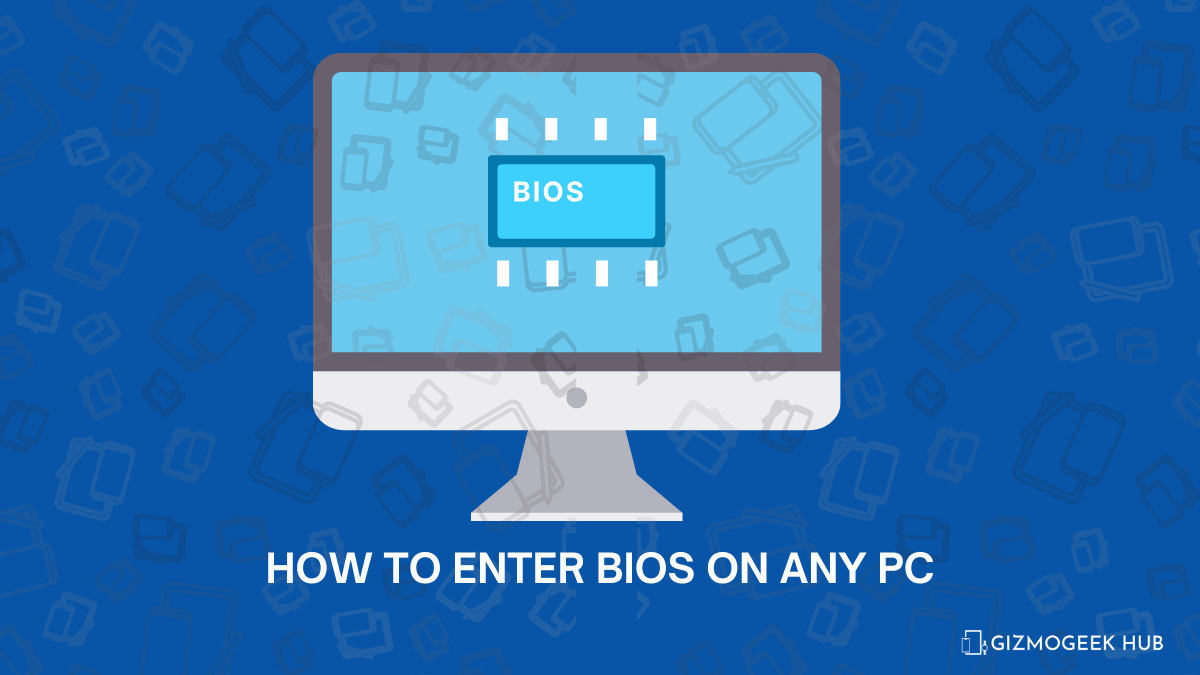
BIOS Menu on a PC However, I have listed a few famous laptop and PC manufacturers, and you can find your own in the list below. I will also tell you how to change boot priority order. Famous laptop manufacturer brands. Remember, you need to repeatedly press the mentioned keys while your computer is booting to enter the BIOS, and if one of them didn’t work, try the other mentioned keys.

BIOS Key

 
  • Acer: Del or F2
  • ASUS: F2 or Del or Esc or F10
  • Dell: F2
  • EVGA: Del
  • Fujitsu: F2
  • HP: F1 or F10 or F11
  • Lenovo:  F1 or F2
  • Micron: F1 or F2 or Del
  • Samsung: F2
  • Sharp: F2
  • Sony/ VAIO (RIP): F1 or F2 or F3 (Although most of them have a separate ASSIST key to access all the menus)
  • Toshiba: F1 or Esc
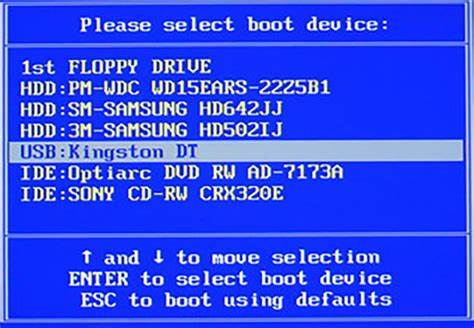
Now once you’re inside BIOS, navigate to the boot option, and find the boot priority section. There, you can refer to the side panel on how to move the options, and easily change to whichever boot drive you want to boot to. If you want to boot to a USB stick, just bring the USB HARD DRIVE to the top, and then save changes and exit. Also read: Create Bootable USB Pen Drive: Step-by-Step Guide Boot priority editing screen. That’s all for the list. Hope you found this useful. Stay tuned for more computer related stuff. Now that you know all the quirky BIOS shortcuts, it’s like you’ve unlocked the secret language of computers. It’s a badge of honor, a nod to your tech-savviness.  We hope this article was helpful to you. You can follow us on X (Formerly Twitter), Instagram, LinkedIn and our WhatsApp Channel to keep updated with us and the latest tech. Keep visiting GizmoGeek Hub, we are always happy to assist you!  
ColorOS 15 Closed Beta Testing Application Started: Leaked Features, Expected Devices and Public Release Date
How to Seamlessly Auto-Record Calls Without Announcement on Samsung Smartphones
How to Fix Wi-Fi Networks Not Showing Up on Windows 11: Easy Solutions
iOS 17.4 Update Unleashes Powerful Performance Boost
How to Easily Join WhatsApp Beta on iOS?

Sign Up For Daily Newsletter

Be keep up! Get the latest breaking news delivered straight to your inbox.

By signing up, you agree to our Terms of Use and acknowledge the data practices in our Privacy Policy. You may unsubscribe at any time.
Share This Article
Facebook Copy Link Print
ByArpit Patel
You may know me as ArpitNahiMila from Twitter/X. I'm a 20-year-old techie, and I love Computers and Smartphone Tech. Contact me on my twitter handle for any queries.
Previous Article bios Create Bootable USB Pen Drive: Step-by-Step Guide
Next Article bios Install Windows on Your PC: Bloatware-Free Guide
Leave a Comment

Leave a Reply Cancel reply

Your email address will not be published. Required fields are marked *

Stay Connected

FacebookLike
XFollow
PinterestPin
InstagramFollow

Latest News

bios
Samsung Galaxy S27 Series Rumors Reveal 2nm Chip and Camera Upgrades
Smartphone Tech News
price increased redmi poco
REDMI and POCO Phones Price Increased in India
Tech News
bios
Xiaomi 17 Ultra and Leica Leitzphone Launched With 1-Inch Camera
Featured Smartphone Tech News
bios
Xiaomi Pad 8 Launched Globally With Snapdragon 8s Gen 4 and 144Hz Display
Featured Gadgets Tech News

You Might also Like

bios
Tech NewsAndroid

WhatsApp Chat Backups: Google Drive Update

Akshay Nair
Akshay Nair
2 Min Read
cross app chatting
Tech NewsAndroid

WhatsApp is Working on a Favourite Contacts Feature

Mayank Yadav
Mayank Yadav
2 Min Read
bios
AndroidFeaturediOS

Why Fast Charging Might Be One Of The Most Revolutionary Smartphone Features!

Abhishek Hari
Abhishek Hari
7 Min Read

GizmoGeek Hub is a tech media blog that simplifies the latest in gadgets, innovation, and digital trends for curious minds and everyday users.

Career

  • Join Us
  • Write for Us

Support

  • DMCA Removal Request
  • DMCA
  • Disclaimer
  • Cookie Policy
  • Affiliate Disclosure

Stay Updated with GizmoGeek Hub

Get the latest on gadgets & tech trends straight to your inbox.
No spam. Just tech, simplified.

GizmoGeek HubGizmoGeek Hub
Follow US
© 2025 GizmoGeek Hub | Proudly part of Cre8sphere Media | Made with ❤️ at Origin8 | All rights reserved.
  • About Us
  • Contact
  • Privacy Policy
  • Terms and Conditions
  • Join Us
Join Us!
Subscribe to our newsletter and never miss our latest news, reviews etc..

Zero spam, Unsubscribe at any time.
Welcome Back!

Sign in to your account

Username or Email Address
Password

Lost your password?