By using this site, you agree to the Privacy Policy and Terms of Use.
Accept
GizmoGeek HubGizmoGeek Hub
  • Gadgets
    • Smartphone
    • Laptop
  • Reviews
  • Tech News
  • How-to Guides
    • Windows
    • MacOs
    • iOS
    • Android
  • Wearables
  • Videos
Search
  • About Us
  • Contact
  • Privacy Policy
  • Terms and Conditions
  • Join Us
© 2025 GizmoGeek Hub | Proudly part of Cre8sphere Media | Made with ❤️ at Origin8 | All rights reserved.
Reading: ChatGPT’s Hands-Free Assistance for Nothing Phone Users
Share
Sign In
Notification Show More
Font ResizerAa
Font ResizerAa
GizmoGeek HubGizmoGeek Hub
  • Gadgets
  • Reviews
  • Tech News
  • How-to Guides
  • Wearables
  • Videos
Search
  • Gadgets
    • Smartphone
    • Laptop
  • Reviews
  • Tech News
  • How-to Guides
    • Windows
    • MacOs
    • iOS
    • Android
  • Wearables
  • Videos
Follow US
  • About Us
  • Contact
  • Privacy Policy
  • Terms and Conditions
  • Join Us
© 2025 GizmoGeek Hub | Proudly part of Cre8sphere Media | Made with ❤️ at Origin8 | All rights reserved.

Home » ChatGPT’s Hands-Free Assistance for Nothing Phone Users

SmartphoneTech News

ChatGPT’s Hands-Free Assistance for Nothing Phone Users

Akshay Nair
Last updated: February 27, 2024 9:36 am
2 years ago
By Akshay Nair
168 Views
Share
SHARE

Last year, OpenAI introduced ChatGPT for Android and iOS. Now, Nothing Phone 1 and Phone 2 users can enjoy hands-free assistance with ChatGPT’s Quick Settings shortcut.

Nothing CEO Carl Pei recently announced via X (formerly known as Twitter) that Nothing Phone 1 and Phone 2 users can now access ChatGPT’s voice commands directly from their home screen and Quick Setting panel through a new shortcut. This feature allows users to quickly access ChatGPT’s voice Assistant similar to Google Assistant and Apple’s Siri.

ChatGPT in Quick Settings + Nothing OS Quick Settings Widget = Delightful experience! pic.twitter.com/FjuNwv5M51

— Carl Pei (@getpeid) January 28, 2024

To set up ChatGPT’s Quick Settings shortcut, Nothing OS users need to install the official ChatGPT android app from the Google Play Store. After using the voice chat feature at least once within the app to complete the setup, users can add the ChatGPT shortcut in both the Quick Settings panel and Quick Settings widget. Tapping on this shortcut icon will activate the ChatGPT-powered voice assistant.
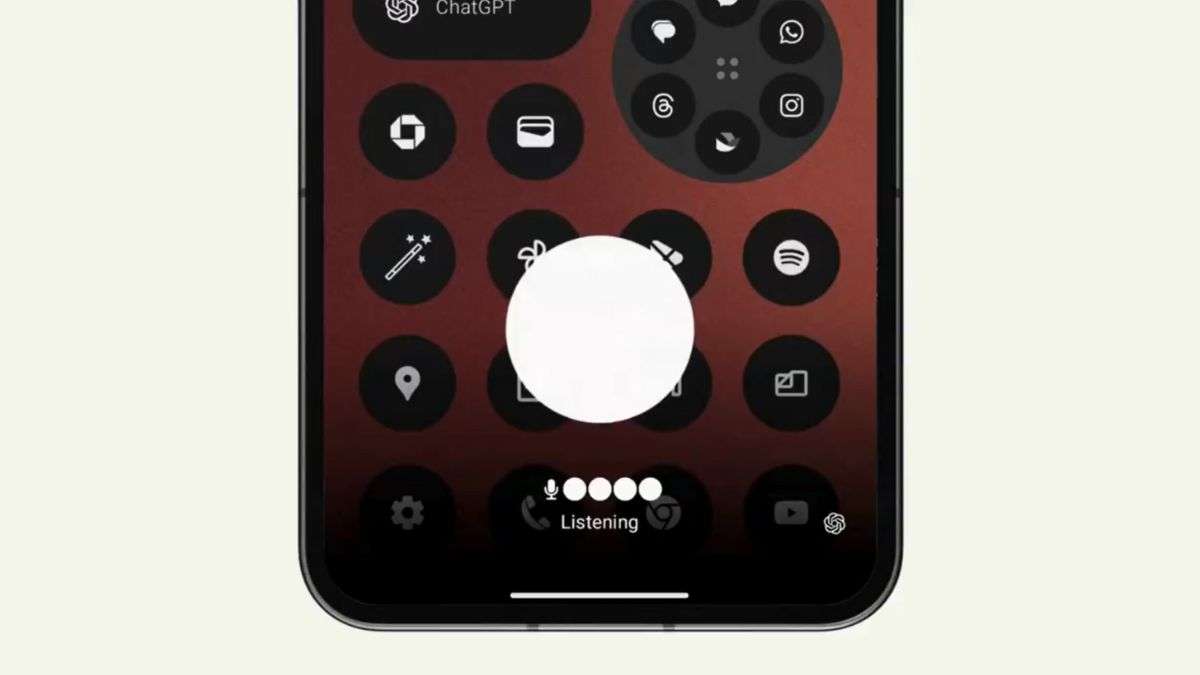
ChatGPT on Nothing Phone

With this latest development, ChatGPT functions as an assistant on Android devices, offering convenient and hands-free assistance to Nothing Phone users.

Also Read-Google Chrome: New Generative AI Features

Nothing currently offers the Nothing Phone 1 and Nothing Phone 2. The Nothing Phone 1, launched in July 2022 on Flipkart, at the starting price of Rs. 32,999 for the 8GB RAM + 128GB storage variant. Meanwhile, the Nothing Phone 2,was released in July last year, begins at Rs. 44,999 for the base 8GB RAM + 128GB storage configuration available on Flipkart. Featuring the Snapdragon 8+ Gen 1 SoC and a revised Glyph Interface with LED lighting, the Phone 2 enhances the user experience for Nothing users.

Advertisements
OPPO Reno 14 and Reno 14 Pro Launched in China: The Ultimate Overview
OnePlus Nord 6 India launch announced for April 7th
OnePlus 15T Battery Officially Revealed With 7,500mAh Capacity
Samsung Galaxy Z Flip7 FE Launched: Exciting Overview
Motorola Signature Launched Globally: Specs and Pricing

Sign Up For Daily Newsletter

Be keep up! Get the latest breaking news delivered straight to your inbox.

By signing up, you agree to our Terms of Use and acknowledge the data practices in our Privacy Policy. You may unsubscribe at any time.
Share This Article
Facebook Copy Link Print
ByAkshay Nair
Follow:
Akshay is a tech enthusiast, creative writer, and entrepreneur. As a contributing writer at GizmoGeek Hub, he delivers insightful articles on the latest tech news and trends. With a passion for storytelling and a keen eye for detail, Akshay brings fresh perspectives and engaging content to his readers.
Previous Article Android Auto is getting a redesign Android Auto is getting a redesign for the Google Assistant and Voice Reply feature is coming
Next Article passkeys Passkeys Finally Make Their Way to WhatsApp on iPhone 
Leave a Comment

Leave a Reply Cancel reply

Your email address will not be published. Required fields are marked *

Stay Connected

FacebookLike
XFollow
PinterestPin
InstagramFollow

Latest News

Android Auto is getting a redesign
Install ColorOS Apps on OxygenOS Without Root: Easy Guide
Android How-to Guides
Android Auto is getting a redesign
Samsung Galaxy Z Fold 8 Wide CAD Renders Exposed
Smartphone Tech News
Android Auto is getting a redesign
My Experience with Stuffcool Mega 2 Power Bank: Surprisingly Reliable
Experience
Android Auto is getting a redesign
OnePlus 15T Listed in Telecom DB, Revealing Key Specs
Featured Smartphone Tech News

You Might also Like

Android Auto is getting a redesign
FeaturedSmartphoneTech News

Nothing Phone 3a Series: Exciting or Disappointing?

Zaid Ansari
Zaid Ansari
6 Min Read
Bootloader xiaomi
AndroidTech News

Xiaomi removed the bootloader unlock option in China

Rayan Moideenkutty
Rayan Moideenkutty
2 Min Read
Android Auto is getting a redesign
FeaturedSmartphoneTech News

TCL Unveils NxtPaper 70 Pro: A Revolutionary Eye-Friendly Display

Rayan Moideenkutty
Rayan Moideenkutty
3 Min Read

GizmoGeek Hub is a tech media blog that simplifies the latest in gadgets, innovation, and digital trends for curious minds and everyday users.

Career

  • Join Us
  • Write for Us

Support

  • DMCA Removal Request
  • DMCA
  • Disclaimer
  • Cookie Policy
  • Affiliate Disclosure

Stay Updated with GizmoGeek Hub

Get the latest on gadgets & tech trends straight to your inbox.
No spam. Just tech, simplified.

GizmoGeek HubGizmoGeek Hub
Follow US
© 2025 GizmoGeek Hub | Proudly part of Cre8sphere Media | Made with ❤️ at Origin8 | All rights reserved.
  • About Us
  • Contact
  • Privacy Policy
  • Terms and Conditions
  • Join Us
Join Us!
Subscribe to our newsletter and never miss our latest news, reviews etc..

Zero spam, Unsubscribe at any time.
Welcome Back!

Sign in to your account

Username or Email Address
Password

Lost your password?