
By using this site, you agree to the Privacy Policy and Terms of Use.
Accept
GizmoGeek HubGizmoGeek Hub
  • Gadgets
    • Smartphone
    • Laptop
  • Reviews
  • Tech News
  • How-to Guides
    • Windows
    • MacOs
    • iOS
    • Android
  • Wearables
  • Videos
Search
  • About Us
  • Contact
  • Privacy Policy
  • Terms and Conditions
  • Join Us
© 2025 GizmoGeek Hub | Proudly part of Cre8sphere Media | Made with ❤️ at Origin8 | All rights reserved.
Reading: WhatsApp Chat Backups: Google Drive Update
Share
Sign In
Notification Show More
Font ResizerAa
Font ResizerAa
GizmoGeek HubGizmoGeek Hub
  • Gadgets
  • Reviews
  • Tech News
  • How-to Guides
  • Wearables
  • Videos
Search
  • Gadgets
    • Smartphone
    • Laptop
  • Reviews
  • Tech News
  • How-to Guides
    • Windows
    • MacOs
    • iOS
    • Android
  • Wearables
  • Videos
Follow US
  • About Us
  • Contact
  • Privacy Policy
  • Terms and Conditions
  • Join Us
© 2025 GizmoGeek Hub | Proudly part of Cre8sphere Media | Made with ❤️ at Origin8 | All rights reserved.

Home » WhatsApp Chat Backups: Google Drive Update

Tech NewsAndroid

WhatsApp Chat Backups: Google Drive Update

Akshay Nair
Last updated: February 27, 2024 9:48 am
2 years ago
By Akshay Nair
149 Views
Share
WhatsApp
SHARE

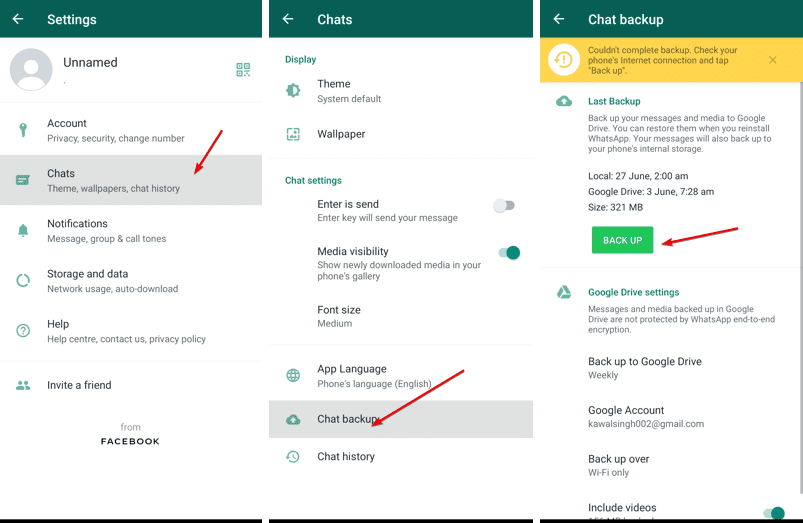
WhatsApp, the popular instant messaging platform owned by Meta, recently updated its terms and conditions, affecting billions of users globally. One significant change announced last year was that chat backups would begin utilizing a user’s Google Drive storage space, slated to commence in the first half of 2024.
WhatsApp
WhatsApp Chat Backups: Google Drive Update 3


Android users using WhatsApp are already experiencing the impact, with chat backups occupying storage space, regardless of whether they are on the free or paid tier of Google’s cloud storage service

Also Read –WhatsApp New Features: Enhanced Privacy and Connectivity

To prevent chat backups from consuming your entire Google Drive storage space, you have several options available. Firstly, you can opt out of backing up chats to the cloud service and utilize WhatsApp’s built-in Chat Transfer tool when transitioning to a new phone. This method requires both the old and new devices to be connected to the same Wi-Fi network, without the need for an active internet connection.

Alternatively, you can expand your storage capacity on Google Drive by subscribing to a Google One plan. Another option is to exclude images and videos from your WhatsApp chat backup, as they can significantly increase the backup size.

These changes are applicable to users on the stable version of the WhatsApp app. Users will receive an in-app notification 30 days prior to the changes taking effect, appearing as a banner in the ‘Chat Backup’ section under the app’s settings.

As WhatsApp continues to evolve, it’s crucial for users to stay informed about updates and changes to ensure a seamless messaging experience while managing storage effectively.


Apple’s Groundbreaking AI-Focused WWDC 24 Event: Everything You Must Know!
realme Neo 8 Launched in China: Snapdragon 8 Gen 5, RGB Design, and 8000mAh Battery
Gemini-Powered Siri Could Arrive With iOS 26.4, Report Claims
Meet the realme 12x 5G: Your Budget 5G Contender!
vivo Funtouch OS 15 Released: Features, Supported Devices, and Rollout Roadmap!

Sign Up For Daily Newsletter

Be keep up! Get the latest breaking news delivered straight to your inbox.

By signing up, you agree to our Terms of Use and acknowledge the data practices in our Privacy Policy. You may unsubscribe at any time.
Share This Article
Facebook Copy Link Print
ByAkshay Nair
Follow:
Akshay is a tech enthusiast, creative writer, and entrepreneur. As a contributing writer at GizmoGeek Hub, he delivers insightful articles on the latest tech news and trends. With a passion for storytelling and a keen eye for detail, Akshay brings fresh perspectives and engaging content to his readers.
Previous Article WhatsApp Realme 12 Pro Series: Best Phones Under 30K?
Next Article WhatsApp Android Auto is getting a redesign for the Google Assistant and Voice Reply feature is coming
Leave a Comment

Leave a Reply Cancel reply

Your email address will not be published. Required fields are marked *

Stay Connected

FacebookLike
XFollow
PinterestPin
InstagramFollow

Latest News

WhatsApp
OxygenOS 16 Experience: The Benchmark Has Been Set
Reviews
WhatsApp
OPPO K14x 5G Set to Launch in India on February 10, 2026: What to Expect
Smartphone Tech News
WhatsApp
iQOO 15R Announced for India With a Large Battery in a Slim Body
Smartphone Tech News
WhatsApp
Samsung Galaxy Buds 4 and Buds 4 Pro Renders Leak Online: Design and Key Details
Tech News Wearables

You Might also Like

Apple Partners With Google
FeaturedTech News

Apple Partners With Google: Gemini to Power Siri and Apple Intelligence

Rayan Moideenkutty
Rayan Moideenkutty
3 Min Read
WhatsApp
AndroidTech News

Unlock Pixel Search Widget On Any Android Device: Fantastic Pixel Search App Review

Abhishek Hari
Abhishek Hari
7 Min Read
WhatsApp
FeaturedTech News

Xiaomi Launches HyperOS 2.0 Globally – A Revolutionary Upgrade

Varun Polisetty
Varun Polisetty
6 Min Read

GizmoGeek Hub is a tech media blog that simplifies the latest in gadgets, innovation, and digital trends for curious minds and everyday users.

Career

  • Join Us
  • Write for Us

Support

  • DMCA Removal Request
  • DMCA
  • Disclaimer
  • Cookie Policy
  • Affiliate Disclosure

Stay Updated with GizmoGeek Hub

Get the latest on gadgets & tech trends straight to your inbox.
No spam. Just tech, simplified.

GizmoGeek HubGizmoGeek Hub
Follow US
© 2025 GizmoGeek Hub | Proudly part of Cre8sphere Media | Made with ❤️ at Origin8 | All rights reserved.
  • About Us
  • Contact
  • Privacy Policy
  • Terms and Conditions
  • Join Us
Join Us!
Subscribe to our newsletter and never miss our latest news, reviews etc..

Zero spam, Unsubscribe at any time.
Welcome Back!

Sign in to your account

Username or Email Address
Password

Lost your password?