
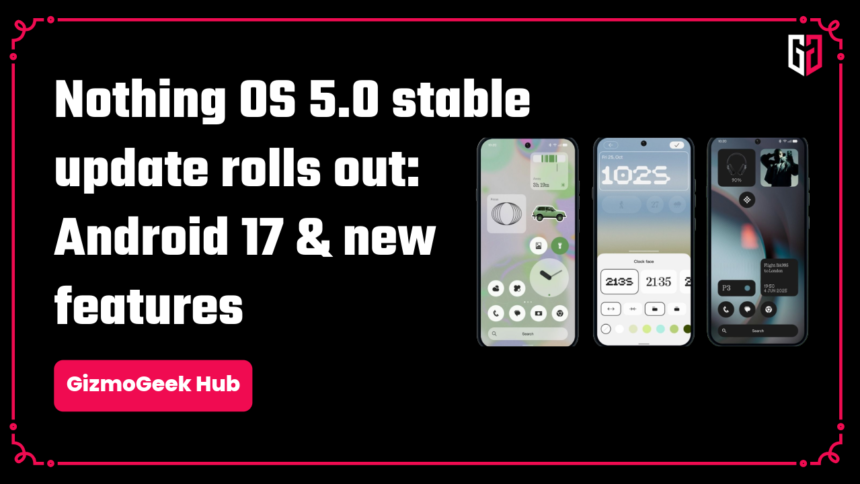
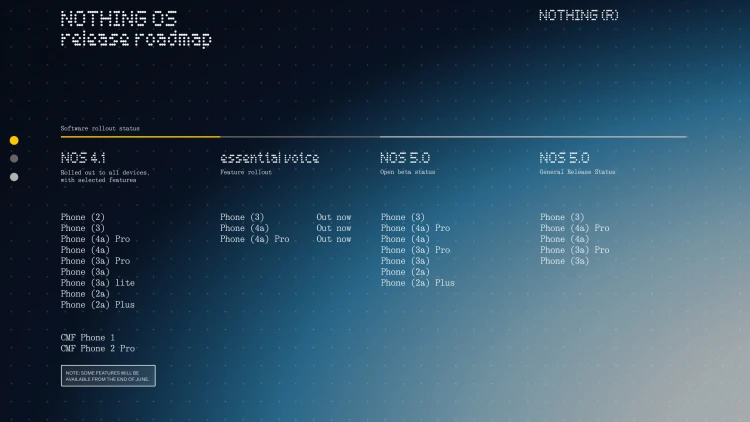
Nothing OS 5.0 stable update is now rolling out to the general public on the Phone (3), Phone (4a), Phone (4a) Pro, Phone (3a), and Phone (3a) Pro.
What’s New
New features include a redesigned Launcher, a micrographics clock face, a refreshed design system, deeper personalisation, smoother performance, improved essential AI tools, and an upgrade to Android 17.
Nothing OS 5.0 has new typography, icons, spacing, materials, and motion that have been refined across settings, the status bar, camera, gallery, widgets, and system controls.
Nothing OS 5.0 now includes Geist as the new system typeface, instead of Roboto or Inter only.
The status bar is now cleaner with new system icons, better animations, and cleaner connectivity indicators. Camera app has newly updated icons, better controls, and more polished motion.
Nothing Gallery can now sort photos into recently added or date added or can be filtered by All, Favourites, Edited, Photos, Videos or Screenshots. We get a new Album page which shows frequently used albums, easy to access; we can now reorder albums. There are transparent elements across some areas of the gallery app.
You can now personalise the home screen, with a transparent element design language, and make the home screen elements adapt based on your wallpaper, etc. The lock screen gets two new clock faces and more color options, we get a Depth Effect wallpaper setting, too.
We have new widgets, such as Away Time (tracks the periods when you put your phone down), Glyph Timer widget (tracks a countdown without repeatedly turning on the display), and the Collector widget (turns objects you want into widgets).
We now get a dedicated Glyph app with OS 5.0; instead of being inside Settings, we get everything Glyph-related within one app.
Aside from design and new features, Nothing OS 5.0 improves everyday usage by being faster and smoother for daily multitasking and better background app management.
Bluetooth controls are now redesigned within the quick settings for easy connection or disconnection with a single tap.
Essential Voice and Essential Space are now updated to be faster and provide better output. Essential Space now comes with a Model Context Protocol (MCP), which allows AI to search and read selected information from your essential space.
Again, there are some more design changes, such as dedicated separate Notifications and Quick Settings options. Quick Share has been improved to make sharing files easier and faster across all devices. Screen recording has been improved to act as a floating action panel for easier reach while recording. Privacy indicators have been minimised by a 3-colour indicator system (Green for sensitive access, blue for location and yellow for AI data processing). Supported apps like Uber can now show Live Updates in the status bar to show your order status.
Android 17 comes with Noto 3D Emoji, which nothing else has included with their OS 5.0. Non-dark theme apps can be made to show the dark theme through the Expanded Dark Theme Setting. Digital assistants can be controlled by a separate volume control, instead of messing with your media audio. HDR Viewing has been improved.
Why is the update not showing?
Nothing OS 5.0 is still in its rollout phase. If you still don’t receive it, you can update Beta Hub,1 which will get you stable Nothing OS 5.0 on your system updates page inside your phone’s settings.
We hope you found this article helpful. Keep exploring GizmoGeek Hub for more tech news, stories, and reviews that will keep you informed about the latest trends and advancements in technology. We aim to provide detailed and unbiased reviews, thorough tutorials, and current news to help you enhance your tech knowledge and skills. Continue reading GizmoGeek Hub for more articles and reviews. Follow us on YouTube, X/Twitter, Instagram, LinkedIn, WhatsApp and Telegram Channel to stay updated on the newest news, announcements, and behind-the-scenes content.
Request – As a new site, we largely depend on ad revenue to support our operations. Please consider turning off any ad blockers you use when visiting our website. Viewing ads helps us continue delivering the high-quality content you enjoy. Your support is very important to us and helps keep GizmoGeek Hub running smoothly. We sincerely appreciate your ongoing support, and thank you for sticking with us!